
Cookie Information for Marketeers. Better data from your marketing cookies to meet your Online Goals.

- Optimize marketing cookies and consent options
- Cookie banner based on corporate identity
- Better opt-in rates on your cookie banner support your online goals and analytics insights
- Better conversions with Google Tag Manager and Consent Mode v2
- Easy implementation with cookie plugin, HTML or Google Tag Manager
- Cookie management fully automated
- Free trial – no credit card required
The Cookiebot solution runs on 2,3 million websites, manages 7 billion Monthly User Consents and supports 47+ languages. CookieInfo is the largest Cookiebot partner in Europe.










Online success depends on cookies and trackers
For some, it’s the ability to be able to use a shopping cart. For the other, analytics data and retargeting (marketing cookies) must be available. And somewhere we also have to comply with cookie laws and regulations.
- Cookies the basics
- GA4, Google Consent Mode and high opt-in rates
- Cookie banner based on your corporate identity
- Legal statement, that’s how you’re in order with GDPR
- Cookie checklist – do I really need a cookie banner?
- Everything arranged in 1 solution
- Support to make the most of your cookie banner
- Advanced: make use of Server Side Tagging
1. Cookie notification and cookie statement – the basics
Want to be compliant in the use of marketing cookies (other than necessary cookies) on your website,
then a cookie notice and a cookie statement is mandatory.
Even if the 3rd party cookie disappears and we move toward 1st party cookies, cookie consent will continue to underlie all future developments such as server side tagging and first-party data. As soon as you collect or compile personal information, you will need to seek cookie consent. A Consent Management Platform (CMP) helps with this.
Inform
The cookie notice informs about the use of cookies and trackers on the website and allows the website visitor to choose which category of cookies will be accepted.
The cookie statement is a detailed overview of the cookies and trackers present on a website. Name, description, purpose and supplier shall be given.
30% of a website’s cookies and trackers change monthly.
Most common mistakes
- Only an “ok” button.
- Showing a cookie notification while cookies are already loaded in the background.
- Pre-ticked check boxes
- No possibility of modifying or revoking the consent given.
- Social shares, embedded content or YouTube ‘no cookie’ that also set cookies and trackers.
- A static cookie statement (PDF), while 30% of cookies change monthly.
Requesting permission
Asking permission to place cookies and trackers is a basic principle of GDPR. Important in this is that cookies and trackers are placed only after consent is given. Unfortunately, this is not well regulated on many websites. It does have a cookie notification, but cookies are loaded “before” consent is given.
This can be overcome with a Consent Management Platform (CMP).
Opportunities!
- Respecting privacy is appreciated by website visitors.
- Accepting marketing and statistical cookies contributes to your online goals.

If you do not accept these cookies, the relevant functionality will not work.
2. GA4 and High opt-in rates.

GA4
You can use Google Analytics 4 (GA4) to analyze your website traffic. By default, GA4 anonymizes ip addresses. If you use GA4 without sharing data with other Google products such as Google Ads or Signals, then you do not need permission to set analytics cookies.
However, if you do not anonymize IP addresses and use other Google products, you will have to ask permission for your GA4 cookies to be set. You do this in the cookie banner.
Tips
High opt-in rates on analytics and marketing cookies by embedding video (YouTube, Vimeo, etc.) on key landing pages.
You can also achieve this by working with social share functionality of Facebook, LinkedIn, Twitter, Snapchat etc.
Use of Google Consent Mode V2: Google tags help ensure that conversions match user consent (consent) for statistical and advertising cookies. Read more
3. Cookie banner designs
Cookies are important to your online goals. Achieve high opt-in rates with CookieInfo custom cookie banners.
You can try the custom cookie banner designs during the trial period.
Colors, logo and text can be customized to match the look and feel of your website.
Your logo in stead of Powered by.


4. Legally in order
Legal consulting firm ICTRecht has reviewed the CookieInfo Custom Banner designs and, on that basis, has issued a legal statement* that the cookie regulations can be met with this solution.
*Available as a download on the CookieInfo website.

Cookie blocking
Cookie consent in compliance with GDPR. Automatic cookie blocking: in a few clicks, your website is compliant with cookie laws like GDPR and CCPA for the use of cookies.
Automatic cookie blocking will block all cookies, except “necessary” cookies, until a user has given their consent.
Google reviews – CookieInfo 4.6 

Melvin Woudenberg | socialbrothers
 Super good help, thoughtful and proactive advice. In addition, the tool does exactly what it is supposed to do.

Danny de Haan | Frankwatching
At Frankwatching, we have had a very nice partnership with Cookieinfo for over a year now. If we have questions we get quick answers.

Michel Verdoes | bax shop
Excellent implementation and support! Quick response to questions, personal attention and solution-oriented – great to work with Cookieinfo!
More Google reviews

5. Cookie Checklist
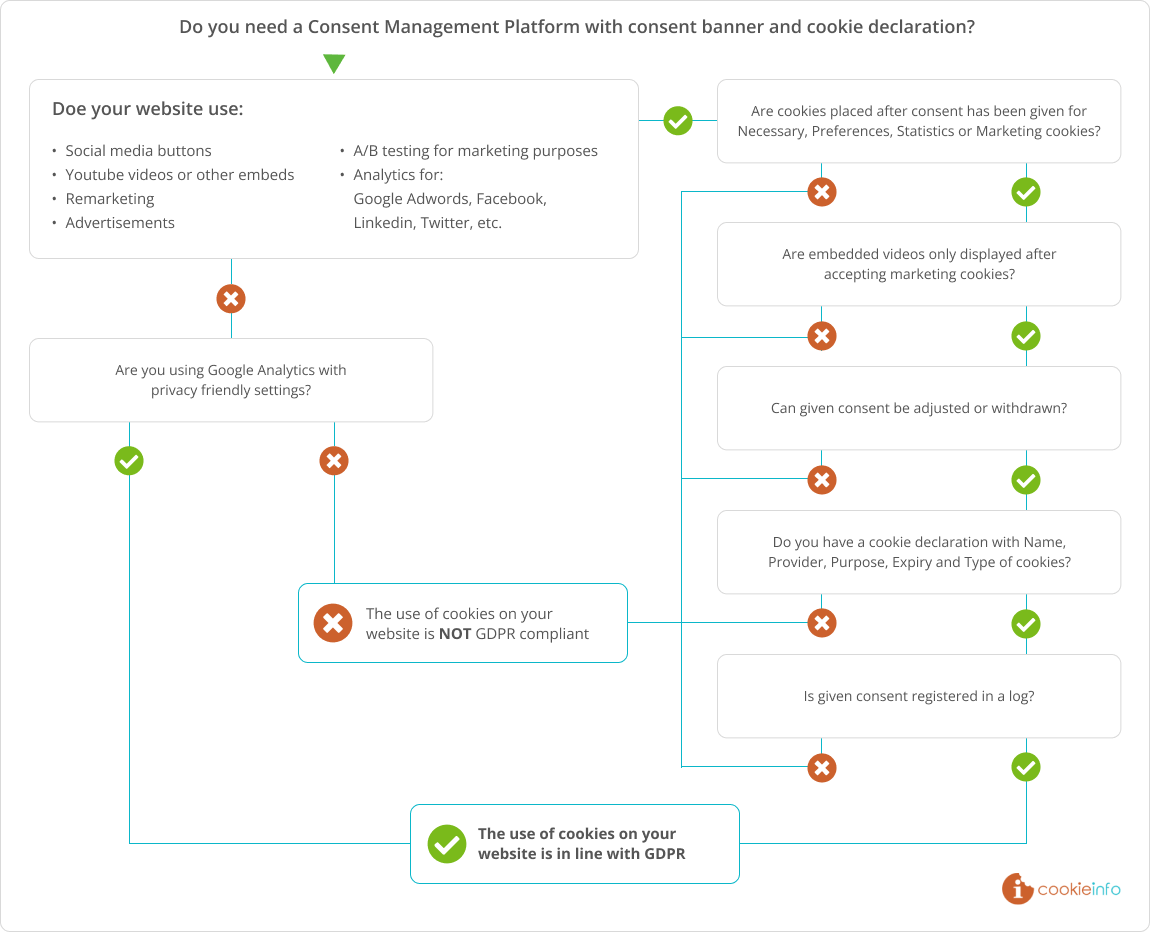
6. Cookie scanner, cookie banner, cookie statement and cookie consent in one solution.
Cookie management on your website on autopilot by implementing 2 scripts.
(Also in combination with Google Tag Manager or WordPress plugin, for example).
- Create a Cookiebot account
You can try the Cookiebot solution free of charge for 14 days. - Enter your website URL
The cookie scanner now goes to work scanning your website for cookies. - Cookie notification and cookie statement
An overview of cookies found, automatically categorized (necessary, functional, statistical and marketing) available in the cookie banner and cookie statement. Settings are managed in the cookie manager. - Implement in your website
Share 2 scripts with your web administrator. By implementing these 2 scripts, your website will have a cookie solution on autopilot.


Script 1
Added to the html header of your website template to enable the cookie permission banner. Either directly in the HTML template, with Google Tag Manager or a plugin for WordPress, Hubspot, etc.
Script 2
Is inserted into the html of the page where your cookie statement should be displayed.

Once the scripts are implemented, your website will have a cookie notification and cookie statement. Formats, texts and permission logs view and edit in the cookie manager.
7. Support
Our support desk helps you implement the cookie banner, cookie statement and consent options. We have an extensive knowledge base with articles to help you with implementation. Are you stuck? Then please contact us.

8. Server Side Tagging
The solution for the ending of third party cookies
With Server Side Tagging you generate more conversions and support your online goals and turnover.
With the hosted GTM solution TAGGRS, Google Tag Manager becomes your best friend. CookieInfo supports you with questions, configuration or implementation. Ideal for companies and agencies.
Read more


 CookieInfo is linked to your account and will offer free advice and support. You can also use our custom banner designs.